xhr、ajax、axios和fetch区别
xhr: 现代浏览器,最开始与服务器交换数据,都是通过XMLHttpRequest对象。它可以使用JSON、XML、HTML和text文本等格式发送和接收数据。
ajax: 为了方便操作dom并避免一些浏览器兼容问题,产生了jquery, 它里面的AJAX请求也兼容了不同的浏览器,可以直接使用.get、.pist。它就是对XMLHttpRequest对象的一层封装
Axios是一个基于promise的HTTP库,可以用在浏览器和 node.js 中。它本质也是对原生XMLHttpRequest的封装,只不过它是Promise的实现版本,符合最新的ES规范。
Fetch API提供了一个 JavaScript 接口,用于访问和操作HTTP管道的部分,例如请求和响应。它还提供了一个全局fetch()方法,该方法提供了一种简单,合理的方式来跨网络异步获取资源
axios的特性
基于Promise
支持浏览器和nodejs环境
可添加请求、响应拦截器和转换请求和响应数据
请求可以取消、中断
自动转换JSON数据
客户端支持方法XSRF
带着问题去看代码
axios拦截器执行顺序?
源码分析 1、源码目录结构 1 2 3 4 5 6 7 8 9 10 11 12 13 14 15 16 17 ├── /lib/ └── /adapters/ ├── http.js ├── xhr.js └── /cancel/ └── /helpers/ └── /core/ ├──Axios .js ├── createError.js ├── dispatchRequest.js ├── InterceptorManager .js ├── mergeConfig.js ├── settle.js ├── transformData.js └── axios.js └── defaults.js └── utils.js
2、入口文件/lib/axios.js 1 2 3 4 5 6 7 8 9 10 11 12 13 14 15 16 17 18 19 20 21 22 23 24 25 26 27 28 29 30 31 32 33 34 function createInstance (defaultConfig ) { const context = new Axios (defaultConfig); const instance = bind (Axios .prototype request , context); utils.extend (instance, Axios .prototype allOwnKeys : true }); utils.extend (instance, context, null , {allOwnKeys : true }); instance.create = function create (instanceConfig ) { return createInstance (mergeConfig (defaultConfig, instanceConfig)); }; return instance; } const axios = createInstance (defaults);axios.default = axios; export default axios
3. Axios.prototype.request 1 2 3 4 5 6 7 8 9 10 11 12 13 14 15 16 17 18 19 20 21 22 23 24 25 26 27 28 29 30 31 32 33 34 35 36 37 38 39 40 41 42 43 44 45 46 47 48 49 50 51 52 53 54 55 56 57 58 59 60 61 62 63 64 65 66 67 68 69 70 71 72 73 74 75 76 77 78 79 80 81 82 83 84 85 86 87 class Axios { constructor (instanceConfig ) { this .defaults = instanceConfig; this .interceptors = { request : new InterceptorManager (), response : new InterceptorManager () }; } request (configOrUrl, config ) { const requestInterceptorChain = []; let synchronousRequestInterceptors = true ; this .interceptors .request .forEach (function unshiftRequestInterceptors (interceptor ) { if (typeof interceptor.runWhen === 'function' && interceptor.runWhen (config) === false ) { return ; } synchronousRequestInterceptors = synchronousRequestInterceptors && interceptor.synchronous ; requestInterceptorChain.unshift (interceptor.fulfilled , interceptor.rejected ); }); const responseInterceptorChain = []; this .interceptors .response .forEach (function pushResponseInterceptors (interceptor ) { responseInterceptorChain.push (interceptor.fulfilled , interceptor.rejected ); }); let promise; let i = 0 ; let len; if (!synchronousRequestInterceptors) { const chain = [dispatchRequest.bind (this ), undefined ]; chain.unshift .apply (chain, requestInterceptorChain); chain.push .apply (chain, responseInterceptorChain); len = chain.length ; promise = Promise .resolve (config); while (i < len) { promise = promise.then (chain[i++], chain[i++]); } return promise; } len = requestInterceptorChain.length ; let newConfig = config; i = 0 ; while (i < len) { const onFulfilled = requestInterceptorChain[i++]; const onRejected = requestInterceptorChain[i++]; try { newConfig = onFulfilled (newConfig); } catch (error) { onRejected.call (this , error); break ; } } try { promise = dispatchRequest.call (this , newConfig); } catch (error) { return Promise .reject (error); } i = 0 ; len = responseInterceptorChain.length ; while (i < len) { promise = promise.then (responseInterceptorChain[i++], responseInterceptorChain[i++]); } return promise; } } export default Axios ;
4. 拦截器实现 1 2 3 4 5 6 7 8 9 10 11 12 13 14 15 16 17 18 19 20 21 22 23 24 25 26 27 28 29 30 31 32 33 34 35 36 37 38 39 class InterceptorManager { constructor ( this .handlers = []; } use (fulfilled, rejected, options ) { this .handlers .push ({ fulfilled, rejected, synchronous : options ? options.synchronous : false , runWhen : options ? options.runWhen : null }); return this .handlers .length - 1 ; } eject (id ) { if (this .handlers [id]) { this .handlers [id] = null ; } } clear ( if (this .handlers ) { this .handlers = []; } } forEach (fn ) { utils.forEach (this .handlers , function forEachHandler (h ) { if (h !== null ) { fn (h); } }); } } export default InterceptorManager ;
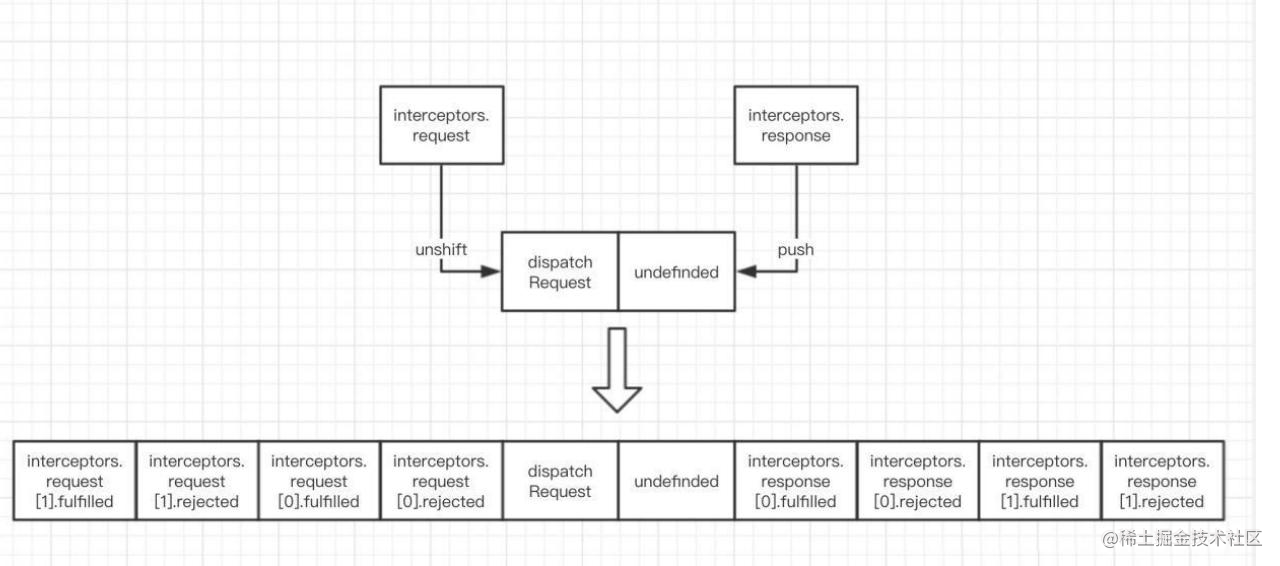
由于请求的发送需要在请求拦截器之后,在响应拦截器之前,所以数组先放入request,接着在数组的前后分别加入请求和响应拦截器,由于加入请求拦截器的方法是unshift,所以最后通过promise进行请求的链式调用的时候,我们可以看到执行顺序是从左往右的,所以最后注册的请求拦截器会最先执行,而响应拦截的执行顺序和注册顺序是一样的。
5、dispatchRequest 我们进入到核心请求方法dispatchRequest中
1 2 3 4 5 6 7 8 9 10 11 12 13 14 15 16 17 18 19 20 21 22 23 24 25 26 27 28 29 30 31 32 33 34 35 36 37 38 39 40 41 42 43 44 45 46 47 48 49 50 51 52 53 54 55 56 57 58 59 60 61 62 function throwIfCancellationRequested (config ) { if (config.cancelToken ) { config.cancelToken .throwIfRequested (); } if (config.signal && config.signal .aborted ) { throw new CanceledError (null , config); } } export default function dispatchRequest (config ) { throwIfCancellationRequested (config); config.headers = AxiosHeaders .from (config.headers ); config.data = transformData.call ( config, config.transformRequest ); if (['post' , 'put' , 'patch' ].indexOf (config.method ) !== -1 ) { config.headers .setContentType ('application/x-www-form-urlencoded' , false ); } const adapter = adapters.getAdapter (config.adapter || defaults.adapter ); return adapter (config).then (function onAdapterResolution (response ) { throwIfCancellationRequested (config); response.data = transformData.call ( config, config.transformResponse , response ); response.headers = AxiosHeaders .from (response.headers ); return response; }, function onAdapterRejection (reason ) { if (!isCancel (reason)) { throwIfCancellationRequested (config); if (reason && reason.response ) { reason.response .data = transformData.call ( config, config.transformResponse , reason.response ); reason.response .headers = AxiosHeaders .from (reason.response .headers ); } } return Promise .reject (reason); }); }
6、适配器adapter 1 2 3 4 5 6 7 8 9 10 11 12 function getDefaultAdapter ( var adapter; if (typeof XMLHttpRequest !== 'undefined' ) { adapter = require ('./adapters/xhr' ); } else if (typeof process !== 'undefined' && Object .prototype toString .call (process) === '[object process]' ) { adapter = require ('./adapters/http' ); } return adapter; }
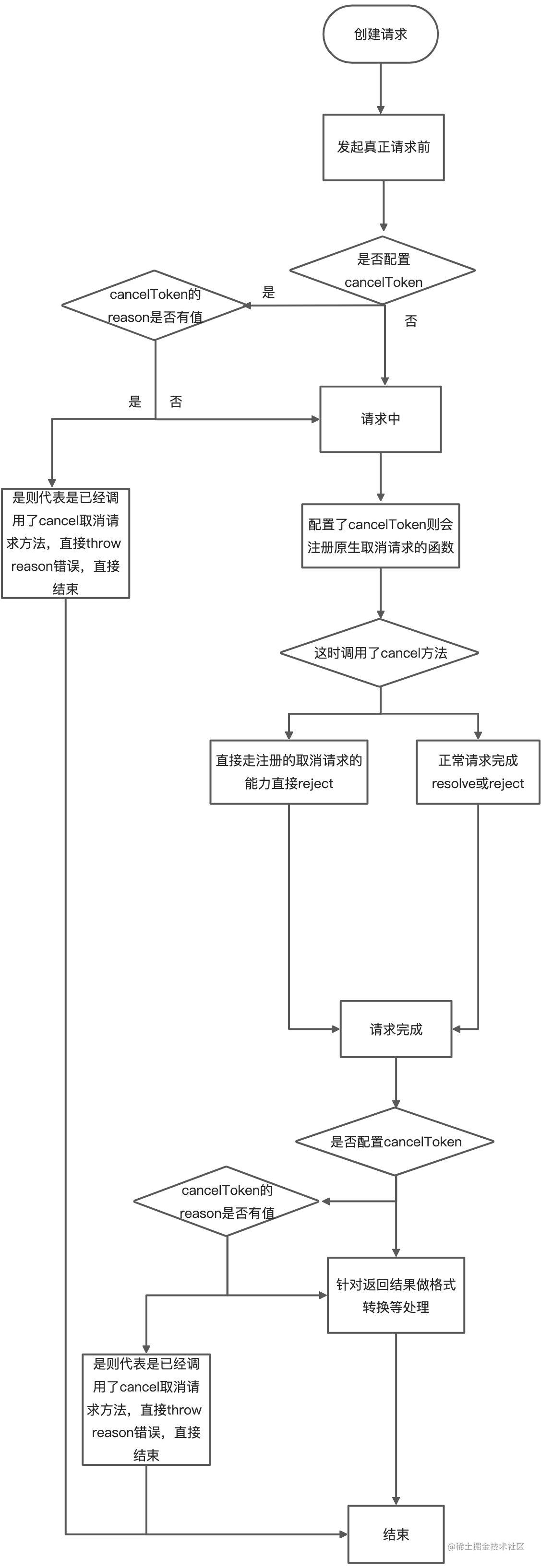
7、axios主动取消请求 终止一个尚未完成的网络请求, status状态为canceled
1、使用axios
1 2 3 4 5 6 7 8 9 10 11 12 13 14 15 16 17 18 19 20 21 22 23 24 25 26 27 28 29 30 31 32 33 34 35 36 import { CancelToken } from axios;const source = CancelToken .source ();axios .get ('/user' , { cancelToken : source.token , }) .catch (function (thrown ) { if (axios.isCancel (thrown)) { console .log ('主动取消' , thrown.message ); } else { console .error (thrown); } }); source.cancel ('我主动取消请求' )
2、CancelToken构造函数
1 2 3 4 5 6 7 8 9 10 11 12 13 14 15 16 17 18 19 20 21 22 23 24 25 26 27 28 29 30 31 32 33 34 35 36 37 38 39 40 41 42 43 44 45 46 47 48 49 50 51 52 53 54 55 56 57 58 59 60 61 62 63 64 65 66 67 68 69 70 71 72 73 74 75 76 77 78 79 80 81 82 83 84 85 86 87 88 89 90 91 92 93 94 95 96 97 98 99 100 101 102 103 104 105 106 107 108 109 110 class CancelToken { constructor (executor ) { if (typeof executor !== 'function' ) { throw new TypeError ('executor must be a function.' ); } let resolvePromise; this .promise = new Promise (function promiseExecutor (resolve ) { resolvePromise = resolve; }); const token = this ; this .promise .then (cancel => if (!token._listeners ) return ; let i = token._listeners .length ; while (i-- > 0 ) { token._listeners [i](cancel); } token._listeners = null ; }); this .promise .then = onfulfilled => let _resolve; const promise = new Promise (resolve => token.subscribe (resolve); _resolve = resolve; }).then (onfulfilled); promise.cancel = function reject ( token.unsubscribe (_resolve); }; return promise; }; executor (function cancel (message, config, request ) { if (token.reason ) { return ; } token.reason = new CanceledError (message, config, request); resolvePromise (token.reason ); }); } throwIfRequested ( if (this .reason ) { throw this .reason ; } } subscribe (listener ) { if (this .reason ) { listener (this .reason ); return ; } if (this ._listeners ) { this ._listeners .push (listener); } else { this ._listeners = [listener]; } } unsubscribe (listener ) { if (!this ._listeners ) { return ; } const index = this ._listeners .indexOf (listener); if (index !== -1 ) { this ._listeners .splice (index, 1 ); } } static source ( let cancel; const token = new CancelToken (function executor (c ) { cancel = c; }); return { token, cancel }; } } export default CancelToken ;
3、请求中是如何处理的cancel
1 2 3 4 5 6 7 8 9 10 11 12 13 14 15 16 17 18 19 20 21 22 23 24 25 26 27 28 29 30 31 32 33 if (config.cancelToken || config.signal ) { onCanceled = cancel => if (!request) { return ; } reject (!cancel || cancel.type ? new CanceledError (null , config, request) : cancel); request.abort (); request = null ; }; config.cancelToken && config.cancelToken .subscribe (onCanceled); if (config.signal ) { config.signal .aborted ? onCanceled () : config.signal .addEventListener ('abort' , onCanceled); } } let onCanceled;function done ( if (config.cancelToken ) { config.cancelToken .unsubscribe (onCanceled); } if (config.signal ) { config.signal .removeEventListener ('abort' , onCanceled); } }
文章来源于
class static静态方法